Higgsfield: קליפ רחפן לפרויקט נדל"ן
מאת בר שאלתיאל · עודכן 18.11.2026
קליפ רחפן אנכי שבו מגדל עולה ממגרש ריק, נוצר ב-Higgsfield בלי לצלם כלום. כולל את כל הפרומפטים, שלושה קטעים ב-Kling 4.0 עם פריים משותף, וחיבור בקלוד קוד.
מה תלמדו
- יצירת קליפ אנכי של כ-12 שניות שבו רחפן צולל למגרש ריק והבניין מתרכב מולו קומה אחרי קומה, בלי צילום אמיתי
- חיבור Higgsfield לקלוד כמחבר מותאם אישית, כדי ליצור תמונות וקטעי וידאו מתוך שיחה
- יצירת שש תמונות של אותו בניין, באותה שכונה ובאותו אור, כשכל תמונה נוצרת מתמונה קודמת כרפרנס
- בניית קליפ מושלם משלושה קטעי וידאו של 5 שניות ב-Kling 4.0, כשהפריים שבו קטע נגמר הוא הפריים שבו הבא מתחיל
- חיבור שלושת הקטעים לקליפ אחד בקלוד קוד, כולל הורדת הפריים הכפול בחיבורים
- האצה הדרגתית של הרגעים האיטיים בקליפ בקלוד קוד
- התאמת הפרומפטים לפרויקט שלכם: שימוש בהדמיה של האדריכל כתמונה ראשונה או שינוי תיאור הבניין
- אבחון קפיצות בקליפ ויצירה מחדש של הקטע הבעייתי בלבד, תוך מעקב אחרי עלות הקרדיטים
למי זה מתאים
- יזמי נדל"ן וקבלנים שרוצים טיזר לפרויקט שעוד לא נבנה
- משרדי שיווק נדל"ן ומנהלי סושיאל שמקדמים פרויקטים
- אדריכלים שרוצים להפוך הדמיה לסרטון תנועה
- יוצרי תוכן ומפיקי וידאו שמחפשים שיטה ליצירת קליפים רציפים עם Kling
- משתמשים ברמה בינונית שכבר עובדים עם קלוד ורוצים לחבר אליו כלי חיצוני
מה אפשר לעשות עם זה בפועל
- טיזר וידאו לפרויקט מגורים שעדיין לא נבנה, ללא הפקת צילום
- קליפ אנכי לאינסטגרם או לטיקטוק שמראה את הבניין מתרכב מגרש ריק ועד מגדל גמור
- סרטון למודעה לשיווק דירות בפרויקט חדש
- הפיכת הדמיה קיימת של האדריכל לקליפ רחפן בכך שמעלים אותה כתמונה הראשונה
- הפקת קליפ לבית פרטי או לבניין משרדים על ידי שינוי תיאור הבניין בפרומפט הראשון
- תיקון קליפ שקופץ: יצירה מחדש של קטע אחד בלבד במקום כל הקליפ
- תכנון תקציב קרדיטים מראש: בקשה מקלוד להציג את המחיר לפני כל יצירה
רמה: בינוני · זמן משוער: 75 דקות
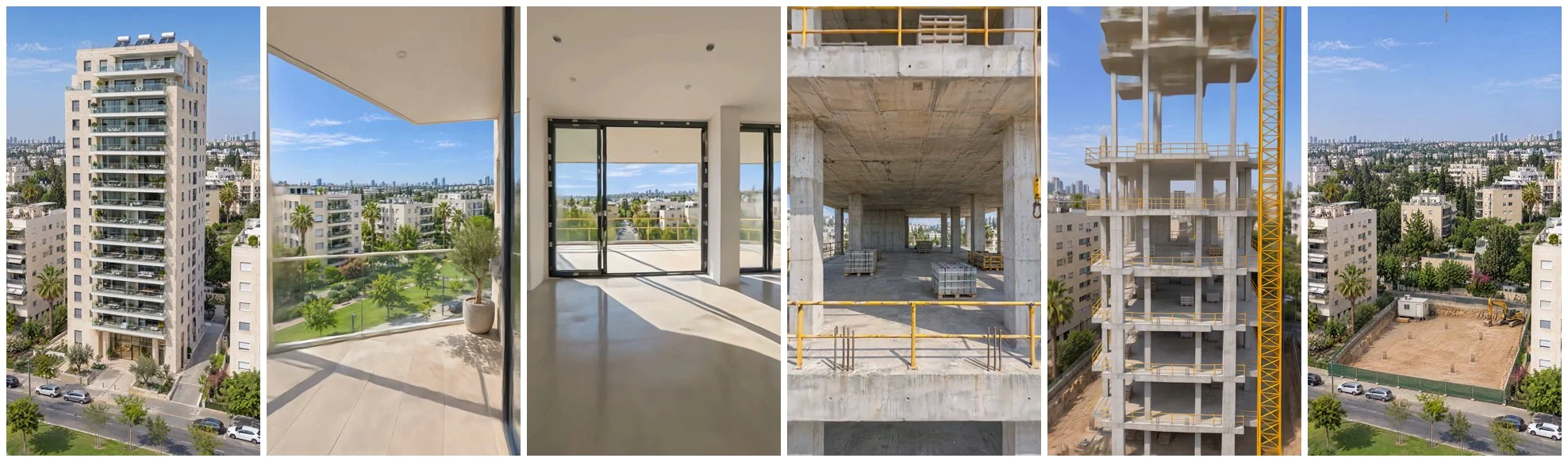
בקצרה: קליפ אנכי של 12 שניות: רחפן צולל אל מגרש ריק, הבניין מתרכב מולו קומה אחרי קומה, הרחפן טס לתוך קומה, יוצא למרפסת ומתרחק אל המגדל הגמור. הכול נוצר ב-Higgsfield מתוך קלוד, בלי צילום אמיתי: שש תמונות, שלושה קטעי וידאו ב-Kling 4.0, וחיבור. העלות כ-65 קרדיטים.
קליפ כזה מתאים ליזמים, למשרדי שיווק נדל"ן, לאדריכלים ולקבלנים: טיזר לפרויקט שעוד לא נבנה, לאינסטגרם, לטיקטוק או למודעה. הפרומפטים כתובים למגדל מגורים בשכונה ישראלית, וקל להתאים אותם לכל בניין אחר.
| מה יוצרים | כמה | קרדיטים |
|---|---|---|
| תמונות ב-GPT Image 2.6, איכות high, 2k | 6 | 16.5 (2.75 לתמונה) |
| קטעי וידאו ב-Kling 4.0, 1080p, 5 שניות | 3 | 48.75 (16.25 לקטע) |
| סך הכול | כ-65 |
המחירים בקרדיטים נכונים לנובמבר 2026. החיבור וההאצה בסוף לא עולים קרדיטים.
איך עובדת השיטה?
במקום קטע וידאו אחד ארוך, יוצרים שלושה קטעים של 5 שניות ומחברים אותם. הסוד הוא פריים משותף: התמונה שבה קטע אחד נגמר היא בדיוק התמונה שבה הקטע הבא מתחיל. ככה החיבור לא נראה, והמצלמה לא קופצת. כל קטע מקבל תנועת מצלמה אחת, והמעברים בין פנים לחוץ קורים בתוך התנועה: טיסה דרך פתח, יציאה דרך דלת מרפסת.
| קטע | מתחיל ב- | נגמר ב- | מה קורה |
|---|---|---|---|
| 1 | מגרש ריק, מלמעלה | פתח של קומה בשלד | צלילה, והבניין מתרכב |
| 2 | פתח של קומה בשלד | מרפסת גמורה | טיסה בתוך הקומה ויציאה למרפסת |
| 3 | מרפסת גמורה | הבניין הגמור, מלמעלה | התרחקות, והחזית נסגרת |
למה לא קטע אחד? בקטע ארוך שמקבל גם פריים פתיחה, גם פריים סיום וגם תמונת רפרנס באמצע, המודל מנסה להגיע לכולם בבת אחת. התוצאה היא קפיצות בגודל הבניין ומעברים שנראים כמו קאט. שלושה קטעים קצרים, שכל אחד מהם מגיע לפריים הסיום שלו בתנועה אחת, נותנים טיסה רציפה.
איך מחברים את Higgsfield לקלוד?
את התמונות והקטעים יוצרים מתוך שיחה עם קלוד, דרך המחבר של Higgsfield. ככה קלוד מעביר את התמונות מקטע לקטע בעצמו, ומציג את העלות לפני כל יצירה.
- אם אין לכם חשבון, נרשמים ל-Higgsfield ובוחרים מסלול עם קרדיטים.
- בהגדרות של קלוד נכנסים ל-Plugins, לוחצים Add ואז Add custom connector.
- נותנים שם, למשל Higgsfield, ומדביקים את כתובת השרת שלמטה.
- ממשיכים ומתחברים לחשבון Higgsfield.
https://mcp.higgsfield.ai/mcpאיך יוצרים את שש התמונות?
כל הקליפ נשען על שש תמונות של אותו בניין, באותה שכונה ובאותו אור. שלוש הראשונות צולמו מאותה נקודה בדיוק, ושלוש האחרונות הן נקודות מבט קרובות. כל תמונה אחרי הראשונה נוצרת מתמונה קודמת כרפרנס, ולכן הבניין נשאר אותו בניין. הפרומפטים באנגלית, כי המודלים מדייקים יותר באנגלית.
לכל תמונה כותבים לקלוד משפט כזה, ומדביקים אחריו את הפרומפט:
ליצור ב-Higgsfield תמונה ב-GPT Image 2.6, איכות high, רזולוציה 2k, יחס 9:16. הרפרנס: [מספר התמונה הקודמת]. הפרומפט:
תמונה 1: הבניין הגמור
בלי רפרנס. זו תמונת הסיום של הקליפ, ומכאן נגזרות כל השאר.
Photorealistic aerial drone photograph, vertical frame. A brand-new 14-storey modern residential tower in a quiet Israeli neighbourhood, like a new street in Tel Aviv suburbs or Modiin. The tower: off-white Jerusalem-style limestone cladding with warm beige tones, large glass balconies with slim white railings on every floor, a clean rectangular volume with a slight setback at the top two floors and a rooftop with solar water heaters. Ground floor: a glass lobby entrance with a small landscaped plaza, young olive trees, a short paved driveway. Around it: lower 4-6 storey apartment buildings with typical Israeli shutters and balconies, a few palm trees, a two-lane street with parked cars, a green park strip. Camera: drone at about 60 metres height, 40 metres back, slightly to the side, looking down at roughly 25 degrees, the whole tower centred and fully in frame from ground to roof. Late morning daylight, clear Mediterranean blue sky with a few thin clouds, soft natural shadows, sharp detail, true-to-life colours. No text, no logos, no people close up, no watermark.תמונה 2: מגרש ריק
רפרנס: תמונה 1. אותה מצלמה בדיוק, רק בלי הבניין. זו תמונת הפתיחה.
Edit this exact photo. Keep the camera position, angle, framing, lens, lighting, sky and every surrounding element identical: the neighbouring buildings, palm trees, the street, the parked cars, the park strip and the skyline. Change only the plot where the tall tower stands: remove the tower completely, and in its place show an empty construction site at the very start of the project. Flat compacted light-brown earth, a shallow excavation pit with a few rebar starter bars for the foundations, a temporary site fence of green mesh along the street, one small site office container and a yellow excavator parked at the edge. Where the tower was, the background behind it (sky, distant city, buildings further back) must now be visible and realistic. The plaza, olive trees and lobby are gone. Same late morning daylight and shadows. Photorealistic, no text, no logos, no watermark.תמונה 3: שלד בטון
רפרנס: תמונה 1. משמשת רפרנס לתמונות 4 ו-5.
Edit this exact photo. Keep the camera position, angle, framing, lens, lighting, sky and every surrounding element identical: the neighbouring buildings, palm trees, the street, the parked cars, the park strip and the skyline. Change only the tall tower: show the same tower in the middle of construction, at the bare concrete skeleton stage. Same footprint, same height of 14 floors plus the setback top, same proportions and same position in the frame. Exposed grey concrete floor slabs and columns, open floors with no walls, no windows and no stone cladding yet, the balcony slabs sticking out on every floor, a yellow tower crane rising beside the building, light scaffolding and green safety netting on the lower floors, a construction site fence around the base with building materials and a concrete mixer truck. No plaza, no olive trees, no lobby glass yet. Same late morning daylight and shadows. Photorealistic, no text, no logos, no watermark.תמונה 4: פתח של קומה בשלד
רפרנס: תמונה 3. כאן נגמר קטע 1 ומתחיל קטע 2.
Use the attached photo as the exact same building and location: the same 14-storey bare concrete skeleton tower with the yellow tower crane, in the same Israeli neighbourhood, same late morning sunlight. New camera position: an FPV drone hovering right outside the street-side facade at the height of the 7th floor, about 4 metres from the slab edge, looking straight into one open floor bay. Frame: the thick grey concrete floor slab edge across the bottom, the slab of the floor above across the top, two square concrete columns on the left and right, and through the open floor you see deep inside the empty level: more columns, a concrete core wall, and daylight from the far side of the building with a glimpse of the neighbourhood beyond. A few pallets of blocks on the slab, rebar ends on the slab edge, a yellow crane cable hanging at the right edge of the frame. Wide-angle FPV lens look, photorealistic, sharp, true colours. No people, no text, no logos, no watermark.תמונה 5: בתוך הקומה
רפרנס: תמונות 3 ו-1. פריים האמצע של קטע 2.
Interior of the 7th floor of the tower shown in the attached photos, mid-construction, seen from an FPV drone flying through it at chest height, wide-angle lens. The camera looks along the empty floor toward the street-side facade. Bare concrete ceiling slab and polished concrete floor, square concrete columns in two rows, fresh white plaster on some walls, large new window and balcony door frames being fitted in the facade openings ahead. Through the openings at the far end: a deep concrete balcony slab and beyond it the bright sunny Israeli neighbourhood with palm trees and lower apartment buildings, as in the attached photos. Late morning sunlight streams in and makes bright patches on the floor. Photorealistic, crisp, true colours. No people, no tools in the foreground, no text, no logos, no watermark.תמונה 6: המרפסת
רפרנס: תמונה 1. כאן נגמר קטע 2 ומתחיל קטע 3.
Use the attached photo as the exact same finished tower and neighbourhood. New camera position: an FPV drone hovering just outside the edge of one 7th-floor balcony of this tower, looking out away from the building over the neighbourhood. Bottom of frame: the balcony's light stone floor tiles and slim white-framed glass railing, with a small potted olive tree; the edge of the off-white Jerusalem stone facade and the underside of the balcony above frame the top. Beyond the railing: the same street with parked cars, the green park strip, palm trees, the lower 4-6 storey apartment buildings with shutters, and the city skyline in the distance, seen from about 25 metres high. Clear Mediterranean blue sky, late morning sun, same light as the attached photo. Wide-angle FPV lens look, photorealistic, sharp, true colours. No people, no text, no logos, no watermark.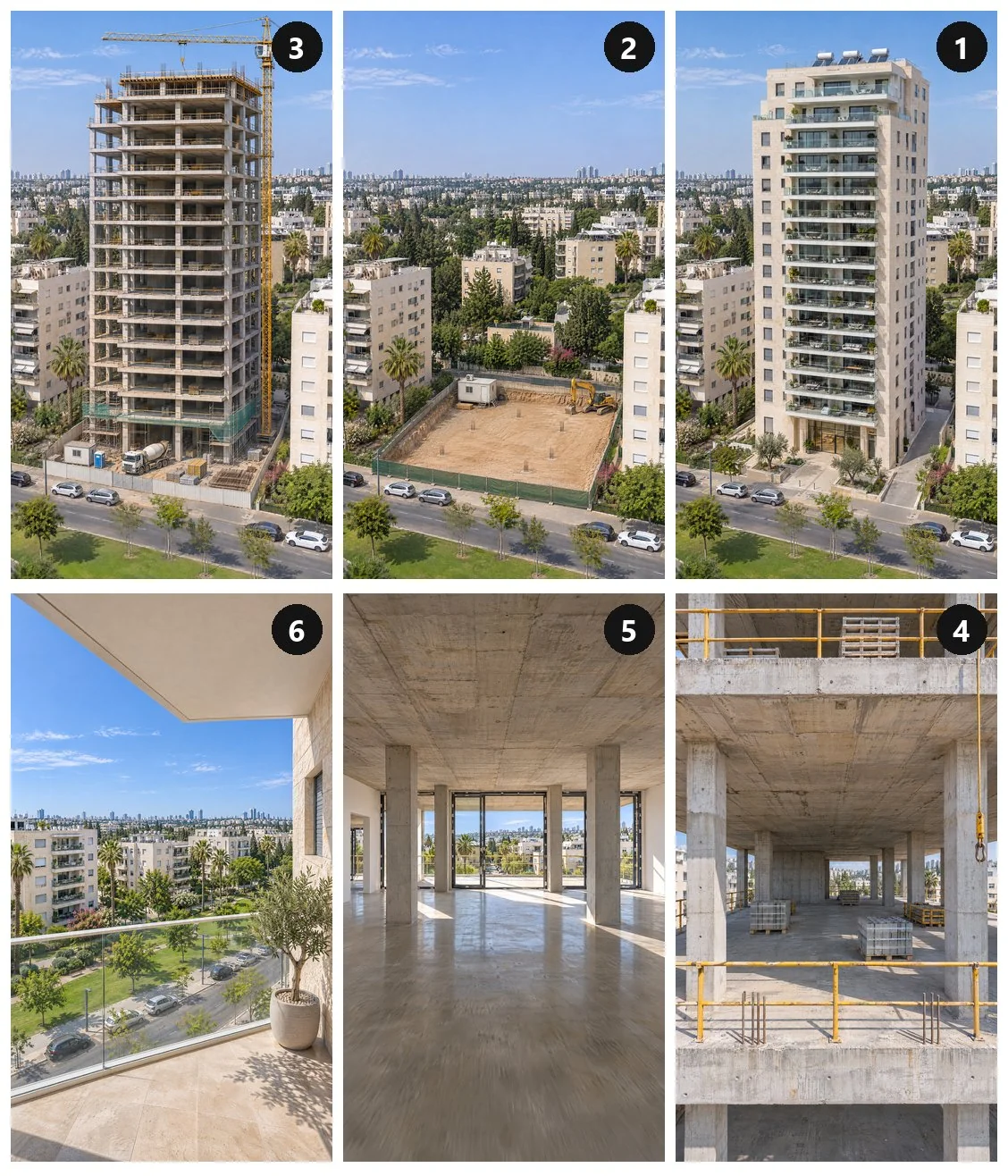
- יש הדמיה של הבניין? מעלים אותה לשיחה, ומבקשים מקלוד להשתמש בה כתמונה 1. את הפרומפט הראשון מדלגים.
- אין הדמיה? משנים בפרומפט הראשון את תיאור הבניין: מספר קומות, חיפוי, מרפסות, גג. כל שאר התמונות נגזרות ממנו.
- בדקו את שלוש הראשונות לפני שממשיכים. המצלמה, השכונה והרחוב צריכים להיות זהים בשלושתן. אחרת ההתחלה והסוף של הקליפ לא יתחברו.
איך יוצרים את שלושת הקטעים?
לכל קטע: Kling 4.0, מצב image-to-video, 1080p, יחס 9:16, 5 שניות. נותנים לקלוד את פריים הפתיחה, את פריים הסיום ואת הפרומפט. בקטע השני מוסיפים גם פריים באמצע, לפי הסדר.
ליצור ב-Higgsfield סרטון ב-Kling 4.0, מצב image-to-video, 1080p, יחס 9:16, 5 שניות. פריים פתיחה: תמונה [X]. פריים סיום: תמונה [Y]. הפרומפט:
קטע 1: מהמגרש לפתח הקומה
פתיחה: תמונה 2. סיום: תמונה 4.
One continuous FPV drone shot, no cuts, constant motion. The drone starts high above the empty fenced construction lot and dives forward and down in one smooth accelerating move toward the plot, while the tower assembles in front of it: square concrete columns shoot up from the foundations, grey floor slabs fly in from the sky and lock onto the columns one after another, floor after floor, the yellow tower crane rises beside the building, small puffs of concrete dust as each slab locks in place. The camera never stops: it keeps diving and arrives level with the 7th floor, a few metres from the slab edge, looking straight into an open floor bay between two columns, exactly the end frame. The neighbouring buildings, the street, parked cars and palm trees stay fixed and consistent. Wide-angle FPV lens, photorealistic late morning daylight.קטע 2: דרך הקומה אל המרפסת
פתיחה: תמונה 4. אמצע: תמונה 5. סיום: תמונה 6.
One continuous FPV drone shot, no cuts, constant forward motion. The drone flies straight into the open floor between the two concrete columns without slowing, glides low through the empty concrete level past columns and pallets of blocks, banks around a column in one smooth 180-degree turn, and accelerates back toward the street-side facade, matching the middle frame: as it passes, white plaster spreads over the walls and new window and balcony door frames snap into the facade openings around the camera. It flies through an open balcony door and out onto a finished balcony with a glass railing and stone floor, ending looking out over the sunny neighbourhood, exactly the end frame. No pauses, steady stabilised FPV movement, consistent late morning sunlight, photorealistic, wide-angle lens.קטע 3: מהמרפסת אל הבניין הגמור
פתיחה: תמונה 6. סיום: תמונה 1.
One continuous FPV drone shot, no cuts, constant motion. The drone launches off the balcony over the glass railing, flies out over the street, then swings around in one wide smooth arc and pulls back and up to reveal the whole tower. During the reveal the last facade elements assemble: off-white Jerusalem stone panels and glass balcony railings fly in and click into place on the top floors, the yellow crane disappears, and the landscaped plaza with olive trees appears at the base. The camera keeps easing back the entire time and glides softly into exactly the end frame of the finished tower, with no static hold. The street, parked cars, palm trees and neighbouring buildings stay fixed and consistent. Wide-angle FPV lens, photorealistic late morning daylight.איך מחברים את הקטעים לקליפ אחד?
שלושת הקטעים יורדים כקבצים נפרדים. את החיבור עושה קלוד קוד: פותחים בו תיקייה, שמים בה את שלושת הקבצים בשמות קטע1, קטע2 וקטע3, ומדביקים את הפרומפט. קלוד מתקין לבד את מה שצריך לעריכה, אם זה חסר.
בתיקייה יש שלושה קטעי וידאו: קטע1.mp4, קטע2.mp4 וקטע3.mp4. לחבר אותם לפי הסדר לסרטון אחד בשם קליפ-רחפן.mp4.
הפריים הראשון של קטע 2 ושל קטע 3 זהה לפריים האחרון של הקטע שלפניו, ולכן מורידים אותו.
באיכות מלאה ובלי סאונד. בסוף לבדוק שאין קפיצה או עצירה בחיבורים.
למה מורידים פריים: הפריים האחרון של קטע 1 והפריים הראשון של קטע 2 הם אותה תמונה. אם משאירים את שניהם, המצלמה "עומדת" לרגע בחיבור, ורואים גמגום.
הקטעים של Kling יורדים עם סאונד, אבל הסאונד של שלושה קטעים נפרדים לא מתחבר טוב. לכן הקליפ יוצא בלי סאונד, ואת המוזיקה מוסיפים באפליקציה שבה מפרסמים.
איך מאיצים את הרגעים האיטיים?
זה שלב רשות. ליד החיבורים ובסוף, המצלמה נוטה להאט כמעט עד עצירה, כי כל קטע "נוחת" על פריים הסיום שלו. בקליפ שבראש המדריך האצנו רק את הרגעים האלה, והוא התקצר מ-15 שניות ל-12.5, בלי לשנות את שאר הפריימים.
בקליפ-רחפן.mp4 יש רגעים שבהם המצלמה כמעט עוצרת: ליד החיבורים ובסוף.
להאיץ רק את הרגעים האלה, בהדרגה, כך שהתנועה לא יורדת מתחת לקצב קבוע. את פריימי הביניים לחשב לפי זרימה אופטית, בלי לשכפל פריימים ובלי למזג שני פריימים.
את שאר הקליפ להשאיר בדיוק כמו שהוא, ולשמור כקובץ חדש בשם קליפ-רחפן-מואץ.mp4.
מה עושים כשהקליפ קופץ?
מה עושה את ההבדל בין קליפ חלק לקליפ עם קפיצות:
גם בקליפ שלנו יש שני רגעים לא מושלמים: בקטע השני המצלמה מתגלגלת לרגע סביב עצמה, ובקטע השלישי העגורן מופיע לשנייה ליד בניין גמור. אם רגע כזה מפריע לכם, יוצרים מחדש רק את הקטע שלו, ב-16.25 קרדיטים. אפשר לנסות להוסיף לפרומפט שלו "no camera roll" או "no crane in the shot".
שאלות נפוצות
אפשר להשתמש בתמונה אמיתית של הפרויקט?
כן. הדמיה של האדריכל, או צילום רחפן אמיתי של המגרש, יכולים להחליף את התמונה הראשונה. כל שאר התמונות נוצרות ממנה כרפרנס, ולכן הקליפ יראה את הבניין שלכם.
למה Kling 4.0 ולא סידנס?
Kling 4.0 מקבל פריים פתיחה ופריים סיום, ונשאר בתנועה רציפה אחת. הוא גם זול יותר ב-1080p: עשר שניות עולות 32.5 קרדיטים, מול 160 בסידנס 2.5. בבדיקה שלנו, קטע אחד של סידנס עם פריים פתיחה, פריים סיום ורפרנס יצא עם קפיצות.
אפשר לעשות את זה בלי קלוד?
המודלים זמינים גם באתר של Higgsfield, עם אותם פרומפטים. את החיבור והחיתוך של הפריים הכפול אפשר לעשות בכל תוכנת עריכה. דרך קלוד זה פשוט יותר, כי הוא מעביר את התמונות בין השלבים בעצמו.
אפשר לבית פרטי או לבניין משרדים?
כן. משנים את תיאור הבניין בפרומפט הראשון, ואת המילים "7th floor" ו-"balcony" בשאר הפרומפטים לפי הבניין. השיטה של שלושת הקטעים נשארת אותה שיטה.
מה עם מוזיקה?
הקליפ יוצא בלי סאונד. מוסיפים מוזיקה באינסטגרם, בטיקטוק או בתוכנת העריכה שלכם.
הקישור ל-Higgsfield במדריך הוא קישור שותפים של המועדון.